Using Walks Manager to submit a walk
Background
In May 2023 Ramblers switched to a new system for submitting walks. This allows leaders to submit their walks directly. The tools which allowed us to capture walks on our own website and easily transfer them are no longer supported by Ramblers, so we will be switching to this new system.
The new system can be found at https://walks-manager.ramblers.org.uk.
Summary
- Everyone needs a My Ramblers account – new-ish members will have received one when they joined us. If you have used certain tools within Ramblers you will already have one, otherwise sign up online.
- All walk leaders must be registered with Walks Manager. We have pre-registered everyone who has led in the last few years. Use the new walk leader form to do so.
- Leaders can update their profile to decide if their contact phone or email are made available.
- Leaders can see what has been submitted, to see which dates have space for more walks.
- Once they have a walk and date, Leaders can propose a walk via the Walks Manager. This is similar to the form filled in before. As before, this should be filled in once you are volunteering a specific walk. If you just want to discuss a general idea, you can contact the walks co-ordinators.
- The Walks co-ordinators will check the submitted walks at least once a week. For weekend walks this is typically on a Sunday or Monday night.
- The Walks Co-ordinators review and check submissions, and add them to our MeetUp page.
- The walk is then online. Walks co-ordinators may publish at any time, but commit to check at least once per week.
Please try to submit walk proposals as far in advance as you can, so that they can be checked and published in good time for the walk and members have time to plan to attend.
Usually, the Walks Coordinator will post a monthly ‘Call for Walks’ with a submission deadline on the Facebook group – please respect this deadline. Occasionally, the Coordinator may extend the deadline for specific weekends or dates only and will post a Facebook message accordingly. Otherwise, walk submissions that have missed the deadline are generally not encouraged and accepted only at the Coordinator’s discretion.
Your Ramblers account
Visit the Ramblers website, click the “sign in” button, sign in with the details you use to maintain your Ramblers membership (there are options for forgotten email, password etc). If ‘Forgotten Password’ appears not to work, check if you have an account.
If you don’t have a My Ramblers Account, visit www.ramblers.org.uk/sign-up to create one.
If you have a problem with your My Ramblers Account you will need to contact Member Support, Met Walkers cannot directly assist with this.
If you can access your Ramblers Account but are not yet set up as a Walk Leader, we can get this set up for you. Please fill in our new walk leader form.
Note it may take up to 2 weeks for Ramblers to register you as a Leader, so please feel free to register as a leader in advance even if you aren’t sure exactly when you’ll lead a walk.
When you have your online account, please consider which of the online training modules your would like to take on the Ramblers TalentLMS portal linked from the Ramblers training page. Some of the training modules may be classified as mandatory before leading a walk. As of June 2024, this is a relatively new requirement so please let us know if you have any difficulties or feedback on the training.
If you have led before
We have attempted to pre-register members who are known to have led a walk in the last few years.
If you are already registered as a Walk Leader you should see a link to “Walks Manager” under “your volunteering”, clicking it takes you to Walks Manager and an “Add a walk” button. Alternatively go directly to https://walks-manager.ramblers.org.uk/
Before you start – Set your Contact Preferences
Before submitting walks, each leader should go to the “Contact Preferences” page of Walks Manager and set your permissions. Unfortunately we cannot do this on your behalf, and the default is for all boxes to be unticked… meaning people don’t see the name of the leader!

We would politely request all Leaders consent to publishing their display name (first name and initial)
Previous practice has been to publish phone numbers. If you prefer you can select to use email. Your email address won’t be published on the internet, the site presents a form which sends you an email. Note that your reply will go via email, so people who you reply to do see your email address.
How to choose a walk date
As a group aimed at a working-age membership, we can only accept weekend/bank holiday walks, and weekday evening strolls. For walks during the working week, other Ramblers groups are available.
To see what other walks are scheduled or proposed, the top of Walks Manager has options for “List”, “Calendar” and “Table” view.

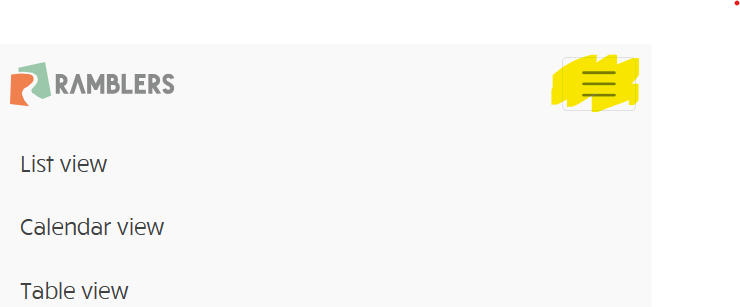
On smaller screens you need to click the “hamburger” icon to see them
We organise one midweek evening walk per week. So if a walk is already scheduled for a given week, please choose another week. We occasionally run events with two co-ordinated walks, please contact the Weekday Walks co-ordinator to discuss if you would like to try this.
As a large group we expect to organise multiple walks each weekend, so you may not be the only person leading on a specific day, especially Saturdays. However, please check what has already been submitted.
As an rough guide:
- On a Saturday, we always want two walks, ideally three, with four allowed if they are sufficiently different from each other, and submitted well in advance. Ideally:
- A shorter walk (Leisurely or moderate up to 12-13 miles)
- Up to two moderate walks (usually in separate areas or different lengths, or both)
- A longer/strenuous/hilly walk
- Sundays are currently less popular with leaders, so we usually don’t worry about having too many walks. We will happily have two walks on the same Sunday. Three would not be a problem, however we usually only have three volunteers in exceptional circumstances e.g. Saturday rail strikes.
- Bank Holiday Mondays will feature weekend-style walks if submitted. Typically we only get one submission unless there has been some special circumstance such as very bad weather or rail strikes.
If two submissions are deemed to ‘clash’, i.e. the walks are too similar and one of the walks needs to move to another date, the Walks Co-ordinator will let you know when reviewing. You are welcome to contact in advance of submitting, for clarification on whether a proposed walk will be deemed to clash, propose alternative dates etc. In general the rule will be “first come first served”. However the Walks Co-ordinator’s decisions are final in regard to which walks take place, please accept that they are a volunteer too and have to balance everyone’s interests.
If a walk proposal is particularly specialist/niche, then we would not deem another similar walk without these factors to be a clash. For example:
- A 26 mile extra-strenuous walk will not block a normal 18 mile strenuous.
- A longer walk that is advertised as especially hill-free would not block a hilly walk.
- A walk visiting an property with admission charges, or taking a boat trip, would not block another walk that does not have these extra charges.
- An overnight walk would not be deemed to ‘clash’ with a normal daytime walk.
Again, the determination of whether a walk is deemed specialist/niche, is made by the Walks Co-ordinator.
It is strongly recommended that such walks are submitted well in advance so that they receive enough publicity.
How to submit a walk
Once you know when you want your walk to take place, it should be submitted for checking.
- Log in to Walks Manager
- Fill in the first page of details
- Enter the title (without distance/grading, that comes later) e.g. “Long Man and his Sisters”
- Enter date and start time. This should normally be the time the train arrives at the start point, rounded up to the next 5-minute interval.
- Fill in the second page
- Walk Description
- Include a paragraph or two describing the walk. Please include “bring a packed lunch” even if you think this is obvious.
- Under the description, add “Terrain:” with a short description (2-3 words is fine)
- For weekend walks, add “Travel:” with travel instructions. In brief, copy the style from previous walks. Detailed directions are given below.
- If you want your walk to have a 30-person limit please add the following line in bold at the start
- “THIS WALK REQUIRES BOOKING VIA MEETUP – See https://www.meetup.com/Metropolitan-Walkers/events/ for details”
- Website Link – please add “https://www.metropolitan-walkers.org.uk/walks”
- Facilities
- All walks must be “Accessible by Public Transport” and “Dog friendly” (unless you have a specific reason to ask dogs not to come)
- If the walk is circular and it has parking you can tick the Car Parking box but our walks are primarily designed around public transport so there is no need to go to great effort figuring this out.
- The fields for toilets, refreshments etc – the use of these fields for walks which aren’t around a single place is a bit debatable, if in doubt leave unticked.
- Our regular weekend walks would not expect to be “Coach trip”, “Car sharing”, “Family friendly” or “Pushchair friendly”. Please do not tick these options.
- There is an option to upload images. This is strictly optional, but please don’t upload images that would breach copyright.
- Walk Description
- Fill in the Location page
- Choose Circular or Linear. If you choose Linear then repeat below points for Start and Finish.
- The start and finish should be the rail stations you are using (not the end pub). The location search will typically find stations easily.
- Under the map, fill in the “Location Details” field enter in the format “xxx station” and include the zone if applicable. Please avoid operator names unless it is part of the actual station name
- Good – “Hassocks station”, “Sutton station (zone 5)”, “City Thameslink station (zone 1)”
- Bad – “Hassocks railway train station”, “Brighton Southern/Thameslink station”
- If finishing at a bus instead of train station, please give clear detail in the main walk description.
- Finally provide the last details
- Difficulty – Weekend walks should be “Leisurely”, “Moderate” or “Strenuous”. We describe those here. Weekday walks should be put as “Easy” in most cases.
- Ascent – only enter if you know it. Leave blank otherwise.
- Estimated finish time – we know this is a controversial topic. For all-day walks this is a very tricky thing to estimate. So unless you are very comfortable estimating a time, please put 11:59 PM. This will signal it is “all day”, and hopefully nobody mistakes that for a real time. The risk of putting a late time that is not obviously silly such as 7/8pm, is that it may lead people to assume the walk will go at a slow pace.
- Press “Submit for Checking”
Unfortunately we do not receive any kind of notification from Ramblers when a new walk is submitted, so you should expect to hear from the Walks Co-ordinators when they go to publish the walk, usually once per week. If you would like feedback before then, please send us an email.
How to write travel information for weekend walks
Note: travel information is not required for weekday evening walks.
With a lot of walks led by a lot of different people, a consistent style when explaining transport is important. The below style has been refined over the years, I’m sure not everyone will agree with all of it but the main reasoning is consistency.
Travel information should be written from perspective of someone travelling from Central London, from the most appropriate terminus,
- If your walk starts from a London Underground station, or part of the Elizabeth Line or Overground with very frequent trains, you may omit timings and say “Please use TfL Journey Planner to get to the start on time”.
- Otherwise, get the train times, use the time the train leaves its starting point in London (see note below about cross-London trains)
- The official list of London Terminals: London Blackfriars, London Cannon Street, London Charing Cross, London Euston, London Fenchurch Street, London Kings Cross, Liverpool Street, London Bridge, London Marylebone, Moorgate, London Paddington, London St Pancras International, London Victoria, London Waterloo, City Thameslink, Vauxhall, London Waterloo East.
- Please provide calling times at key London stations that the train calls through.
- Any “London Terminals” station the train calls at. The main Central London stations with through trains are: London Waterloo East, London Bridge, London St Pancras International , Clapham Junction, Vauxhall.
- Regional interchanges: Harrow-on-the-Hill, East Croydon, Bromley South, Stratford, Stratford International, West Hampstead Thameslink. Avoid mentioning non-London boarding points.
- Occasionally (usually engineering work) trains will start at Clapham Junction, Finsbury Park etc, in that case quote that station, do not quote tube times from National Rail as these are not reliable.
- For linear walks only, we need to indicate what ticket to buy, usually the furthest away station. Write “Buy return to _____”, or “Buy return to _____, plus single from ___ to _____” if needed. In a few cases where train lines split apart and come together the ticket can be bought to a third station. “Buy two singles” should only be used if that’s the only option.
- If the walk is entirely within the Oyster/contactless zone, then instead of ticket advice you can write “Use Oyster/contactless”, or “Use contactless” if you are somewhere where Contactless is accepted and Oyster is not.
- In a few cases you may wish to specify multiple journeys (e.g. with/without HS1). If so, put the quicker journey first. Then the second with “Alternatively,” preceding it. You should only include these if you are happy to wait for both trains – if not just include your preferred one (the approach works well for HS1 because usually the two journeys join together so you only wait for one train at the start).
- If the journey is to somewhere outside the Network Railcard area, we usually mention this and suggest buying Advance or Group tickets. There are only 1 or 2 realistic venues this applies to, mostly out west (Pewsey, Stroud).
Then write it up, times as H:MM, alternative stations in brackets, and changes of train indicated using “dep.” and “arr.”
Examples to follow
Take 9:59 from London Charing Cross (10:02 London Waterloo East, 10:08 London Bridge) arr. Sevenoaks 10:31.
Take 9:29 from London Charing Cross (9:32 London Waterloo East, 9:38 London Bridge), change at Paddock Wood (arr. 10:17 dep. 10:30) arr. Yalding 10:37.
Take 9:50 from London Waterloo (9:57 Clapham Junction), arr. Overton 10:46. Buy return to Overton.
Take 9:34 from London St Pancras International (9:41 Stratford International), change at Ashford International (arr. 10:11, dep. 10:24), arr. Ham Street 10:32 (requires HS1 ticket). Alternatively take 8:40 from Charing Cross (8:43 Waterloo East, 8:49 London Bridge), change at Ashford International (arr. 10:00, dep. 10:24), arr. Ham Street 10:32. Buy return to Rye.
Bad examples
Take 08.10 from London Victoria (time format)
…arr. Hassocks 10:30. Buy return to Hassocks (not necessary if circular walk)
Take 09:00 from London Waterloo, change at Clapham Junction (if the train being changed to came from Victoria, just put time for Victoria. If in the rare case the train only starts at Clapham Junction put the time from Clapham Junction, people can work it out.)
Trains originating at Charing Cross
Many Southeastern trains originate at Charing Cross and call at Waterloo East and London Bridge – please include times for all three even if you will be getting on at London Bridge.
Trains that do not meet a London Terminus
Very occasionally a train route may not start from a London Terminal, in these cases use common sense and specify the station nearest Central London.
Cross-London trains
If you are using Thameslink or Elizabeth Line services that cross London, there isn’t an obvious Terminus to use.
In these cases the ‘start’ time would be the central London station closest to the ‘right’ direction e.g. London Bridge or Blackfriars to the south or St Pancras to the north. In these cases the major station at the opposite end can be mentioned in brackets but with an earlier time. Example: Take 9:45 from London Bridge (9:30 London St Pancras, 9:59 East Croydon) arr. Balcombe 10:25.
It is not necessary to list all the intermediate times for stations between St Pancras and Blackfriars/London Bridge.
Examples of Good Walk Descriptions
Open walk
Beginning with exploring the ponds around Wraysbury, we then visit the historic location of the signing of Magna Carta in Runnymede. Bring a packed lunch. This is followed by traversing the Southern shoreline of the beautiful Virginia Water lake, and taking the Long Walk through Windsor Great Park. The walk ends in Windsor, with an optional pub stop.
Terrain: Riverside/lakeside paths, meadows, woods
Travel: Take the 9:18 from London Waterloo, arrive in Wraysbury at 10:27 Please note that this return leg from Windsor Central & Eton to London Paddington requires a change of trains at Slough. Buy two singles (outward and return journeys use separate train lines)
Walk requiring booking on MeetUp
THIS WALK REQUIRES BOOKING VIA MEETUP – See https://www.meetup.com/Metropolitan-Walkers/events/ for details
This walk has some great views in the High Weald AONB and then follows the Eden Valley Way into Edenbridge. Bring a packed lunch, pub stop at lunchtime for drinks only. Also pub at the end.
Terrain: High Weald
Travel: Take 10:07 from London Bridge (10:22 East Croydon), arrive Ashurst (Kent) 10:57. Buy a return to Ashurst (Kent).